Built so no one sees more than their job needs. Including us.
Your agents never hold platform keys. Credentials are stored encrypted, opened in memory for a single call, and every decision is recorded. This page shows where each piece lives and who can touch it.
The short version.
If you only read one part of this page, read this. Everything below is the detail behind these five lines.
- What your agents hold
- A signing key that proves which agent is calling. Never a platform credential.
- How credentials are kept
- Encrypted at rest, opened in memory for one call, then dropped. Never logged, never returned to the agent.
- Whose key locks them
- Your organisation’s own key. On paid plans it sits in a hardware security module that won’t release it.
- What the record allows
- New rows only. The audit log can’t be edited or deleted through any path in the product, and every decision carries a signed receipt.
- Where it runs
- Australia, in one region without multi-region failover. If the service is unreachable, calls fail closed. Need data held in another region? We can stand one up for you.
Four zones, and what each one holds.
A call crosses these from left to right. A usable credential never sits in plain text on both sides of a boundary, and each zone would fail in a different way.
Your machine
Where your agent runs
No credential here
Holds
- The agent’s private signing key
- A signed token, for about 60 seconds
Never here
- Any platform credential
Break in here, and you get
One agent’s signing key. It opens only what you granted that agent, and revoking the agent stops it on the next call.
The AgentValet broker
In Australia, reachable only through an encrypted tunnel
Unlocked in memory, for one call
Holds
- The checks: who is calling, and may it?
- A decrypted credential, for one call
Never here
- Credentials at rest
- Your agent’s private key
Break in here, and you get
No stored credentials. The broker keeps none at rest, and each one it unlocks is dropped when its call returns.
Encrypted storage
PostgreSQL and Key Vault
Locked, with the keys kept apart
Holds
- Credentials, encrypted
- The keys that unlock them, themselves locked
- The append-only audit log
Never here
- A plain-text credential
Break in here, and you get
Ciphertext. The keys that unlock it are locked in Key Vault, so a copy of the database alone opens nothing.
The platforms you connect
Slack, GitHub, Gmail and the rest
As the platform issued it
Holds
- The account you authorised, with the access you chose
Never here
- Your other platforms’ credentials
Break in here, and you get
That one platform’s account. It holds nothing that opens your other tools.
The token broker that refreshes OAuth tokens runs alongside the broker, in Australia. Exactly where credentials are stored is set out once, in the trust centre.
Four keys, two holders.
You hold one key: your agent’s private signing key. AgentValet holds the other three, each with one job. Stealing our PostgreSQL database alone opens nothing, because the keys that unlock it live somewhere else.
You hold
AgentValet holds
Organisation key locks
Credential key locks
Your Slack token, one credential
A lock inside a lock. A stolen copy of the database holds only the inner two, still locked. On paid plans the outer key never leaves its hardware.
Agent identity key
Proves which agent is calling. Every request is signed with it.
RSA 2048, signing RS256 tokens that expire in about 60 secondsHeld by
You hold the private half. We hold the public half.
If it’s lost
One agent
Revoke the agent and install it again with a new key. Nothing else changes.
Organisation key
Locks every credential key that belongs to your organisation.
Paid: RSA 4096 in hardware. Free: a 256-bit key derived with HKDF-SHA256Held by
AgentValet. On paid plans, inside a hardware security module in Key Vault. On Free, a per-organisation key derived inside Key Vault.
If it’s lost
Every stored credential
Every stored credential for your organisation becomes unreadable. You reconnect your tools.
Credential key
Encrypts one credential. A fresh key is made for each one and bound to your organisation.
AES-256-GCMHeld by
AgentValet, stored only in locked form next to the credential it encrypts.
If it’s lost
One tool
That one credential is gone. You reconnect that one tool.
Receipt key
Signs a receipt for every decision, so anyone can check a record wasn’t altered.
ES256 (P-256)Held by
AgentValet. The public keys are published.
If it’s lost
Nothing stops working
We rotate it. Retired public keys stay published, so old receipts still verify.
On the Free plan
Every credential still gets its own AES-256-GCM key bound to your organisation. What Free doesn’t get is an organisation key held in dedicated hardware, which is what makes a key impossible to copy out and gives each key its own access log. Upgrading moves you onto a hardware key automatically, with no downtime.
Where the agent key is made
The installer generates it on your machine and sends us only the public half. Two setup paths generate it on our side instead: adding a Claude Desktop agent from the dashboard, and accepting a teammate invite. There we hand the private key over once and keep no copy.
One credential, from sign-in to gone.
Plain text exists only for the moment it takes to encrypt it or use it. The rest of the time, it’s ciphertext.
You connect a tool
In your browser, through the platform’s own sign-in
The platform hands a token to AgentValet over TLS. We make a fresh credential key, encrypt the token with it, lock that key with your organisation key, and forget both plain-text copies.
Only ciphertext is stored
PostgreSQL, isolated per organisation
The database keeps the encrypted credential, the locked credential key, and a reference to which organisation key locked it. Row-level security keeps one organisation’s rows invisible to another, even inside the database.
Your agent asks to act
Your machine to the broker
The agent signs a token that expires in about 60 seconds. The broker checks the signature, then the agent’s status, its grant for that tool and scope, your guardrails and policy, the circuit breaker and, for a child agent, its parent. If a person must agree, the call waits here. No credential has been touched yet.
Decrypt, call, drop
Broker memory, for one call
Your organisation key unlocks the credential key, which decrypts the credential. It’s attached to the outbound call and dropped when the call returns. Nothing is logged that could rebuild it.
The decision is recorded
The append-only audit log
One row: who, which agent, which tool and action, the decision, the policy version that made it, a request id, and which connection was used. It is signed with a receipt. It never holds the credential or the response body.
Who can see what.
Look down the first column. Nobody on your side, including your own agents, ever sees a credential in plain text. The platform that issued it does, and so can we, only with privileged access that’s logged. The table says so rather than pretending our access is zero.
| Who | The credential in plain text | The encrypted credential | Grants and policy | The audit record |
|---|---|---|---|---|
| You and your adminsThrough the dashboard | Never | That it exists | All of it | All of it, for your plan’s history |
| Your agentThrough the broker | Never | Never | Its own grants | Receipts for its own calls |
| An approval delegateThrough a passkey or email link | Never | Never | The one action they’re asked about | That one action |
| AgentValet operatorsTo run and support the service | Only with privileged Key Vault access. Every vault operation is logged. | Can read it, as ciphertext | Can read it | Can read it |
| The platformSlack, GitHub and the rest | Sees it on each call, as it issued it | Never | Never | Never |
Ways to cut access, narrowest first.
Each works on its own and takes effect on the next call. None of them needs us to ship code.
Remove one scope
One agent loses one permission. Its next call for that scope is refused. Nothing upstream changes.
Suspend or revoke an agent
Its signed tokens stop working on its next call, and the refresh tokens we issued it are revoked. Every other agent keeps working.
Disconnect a tool
Every agent loses that tool on its next call, and the stored credential is deleted.
Destroy the organisation key
Every credential it protected becomes unreadable at once. This one we carry out for you, after verifying the request with your organisation’s owner. The other three are yours, in the dashboard.
And one you don’t have to pull: the circuit breaker suspends an agent by itself after repeated authentication failures or API errors, and it stays suspended until a person looks and resets it.
What we don’t do, even when it would be convenient.
We never log credentials.
Not in development, not in production, not in error traces. Code that touches the decrypt path is sanitised at source.
We never store a platform token in plain text.
It’s encrypted before it reaches storage, and exists in plain text only in memory, for one call.
We never share a key between organisations.
Each organisation has its own key, so a problem in one can’t open another.
We never hand a credential to an agent.
Not in a response, not in an error, not in a receipt.
We never let a change wait.
A grant you remove takes effect on the next call. No agent token lives longer than about a minute.
The standards underneath, in plain words.
None of this is a proprietary format. If your team wants to verify a claim on this page with its own tools, these are the published specifications to reach for.
Who is calling?
Every request proves which agent sent it.
RS256 signed tokens (JWT)A short message signed with the agent’s private key, which anyone holding the public key can check.
Every agent request. Each token expires within about 60 seconds.
SPIFFE IDA standard naming format for workload identities.
Recorded for each agent at registration and checked against the token it signs.
W3C did:webA decentralised identifier that resolves to a document on a web address.
Per-agent documents, when your organisation opts in.
May it do this?
Access is granted, checked and narrowed with published rules.
OAuth 2.1 with PKCE and RFC 7591The standard sign-in and consent flow, with dynamic registration for new clients.
How remote clients such as Claude Desktop connect and ask for your consent.
AuthZEN 1.0A standard question and answer: may this subject take this action?
A live endpoint answered by the same check every call goes through. An agent can ask only about itself.
ToIP TRQP v2A trust-registry query: is this agent recognised and authorised?
Live endpoints over the same check. Conformance is our own assessment.
RFC 8693 attenuationThe rule that delegated access can only narrow, never widen.
Child agents get a subset of their parent’s access, enforced on every call.
What happened?
Every decision leaves a record anyone can check.
ES256 signed receipts (JWS)A signed record of one decision that can be checked without trusting us.
Every allow, hold and refusal. Public keys are published.
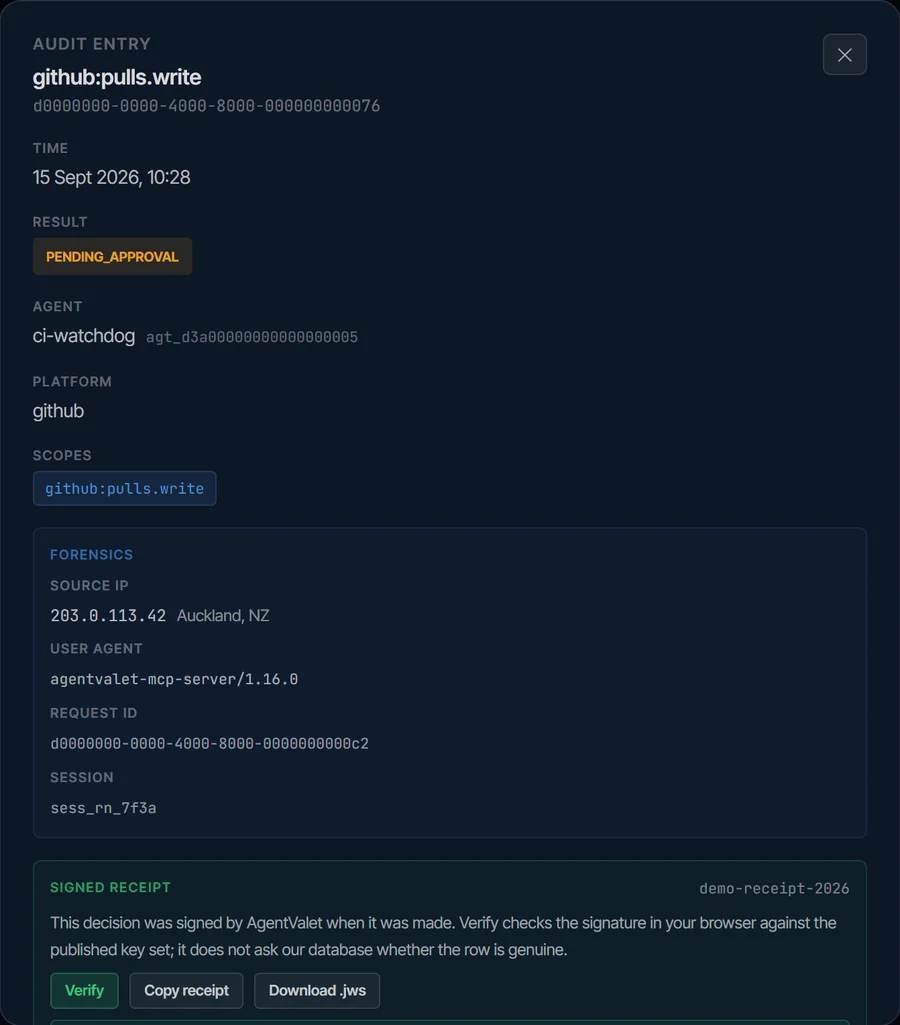
What a receipt looks like
Every entry in the audit log carries one, signed when the decision was made. Verify checks the signature in your browser against our published keys, so knowing a row is genuine doesn’t depend on trusting our database.
Receipt public keys: api.agentvalet.ai/.well-known/agentvalet-receipt-keys.json
Need to go deeper before you can say yes?
We send security reviewers a detailed architecture document, a DPIA template and a written breach-analysis Q&A, under NDA. If your team needs to dig into any layer on this page, that’s the next conversation.
Read it here, then try it on a real agent.
Put one agent through AgentValet on the free plan and check every claim on this page against what it actually does. If the record and the approvals don’t satisfy your security team, turn it off.
Email [email protected] and a real person reads it and writes back. No ticket queue.